
Appearance
Share Repositories in the JFrog Platform
Share Repositories
Note: At this time, only JFrog platform administrators can share repositories with other projects. If you need to share a repository, submit a request via ServiceNow.
- ServiceNow Ticket format guideline:
- Repository Name(s):
- example-repository-local
- foobar-repository-remote
- Share With:
- Ford Public Resources
- Ford Supplier Public Access
- Ford China Public Access
- Specific project(s) (list project names or keys)
- Repository Name(s):
For JFrog Platform Administrators
In the Repositories menu under Administration, click the three-dot "..." menu next to the repository and select "Share"
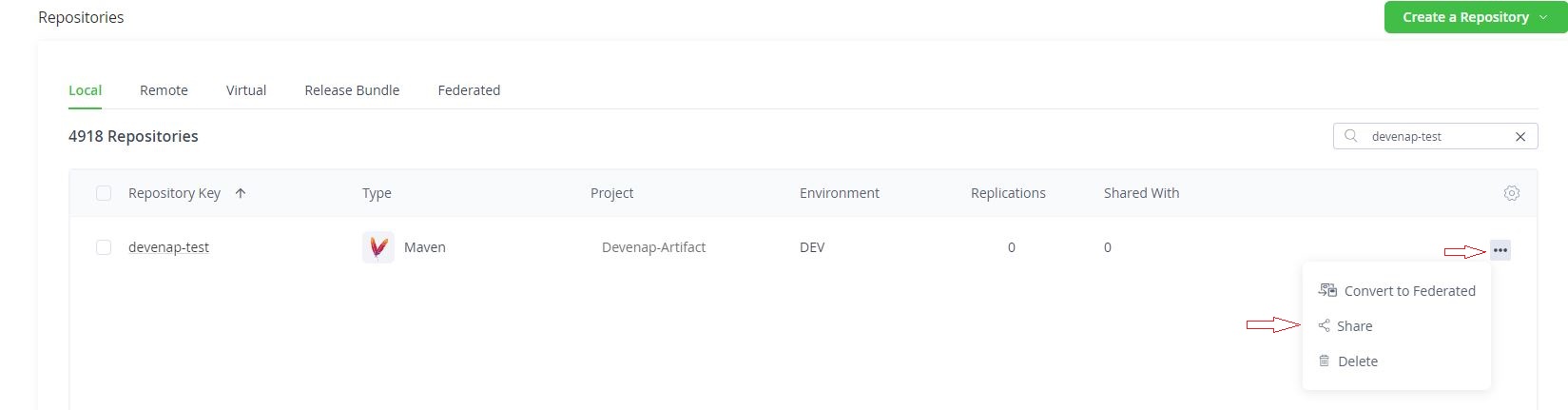
Figure 1. Share Repositories Search for the project to share with. Select the checkbox next to the project and click "Save".

Figure 2. Share Repositories 2