
Appearance
JFrog Authentication Support for Pipelines
- Tekton: Gradle
- Tekton: NPM
- Jenkins: Gradle
- Jenkins: NPM
- CloudBuild: Gradle/NPM
- GitHub Actions: Gradle
- Ubuild
If JFrog authentication works locally but not in your CI/CD pipeline, use the following guides and support channels for troubleshooting and configuration.
JFrog Authentication with Tekton for Gradle
- Please follow the EcoBoost Spring Boot Apps For Tekton Pipeline build
- Additional support is available in devenablement-user-community discussion board.
JFrog Authentication with Tekton for NPM
- Please follow the JFrog devenablement pipeline task details and configuration
JFrog Authentication with Jenkins for Gradle
- Please follow the Jenkins Pipeline Jfrog Authentication for Gradle
JFrog Authentication with Jenkins for NPM
- Please follow the Jenkins Pipeline Jfrog Authentication for npm
JFrog Authentication with CloudBuild for Gradle/NPM
- Please follow the Cloud Build JFrog Guide for Gradle
Please follow the Cloud Build JFrog Guide for npm
Additional support can be found in this Teams Channel
JFrog Authentication with Github Actions for Gradle
From github repository "Settings" menu, open "Secrets and variables" --> "Actions". Under "Repository secrets", create ARTIFACTORY_USER and ARTIFACTORY_PASSWORD secret.
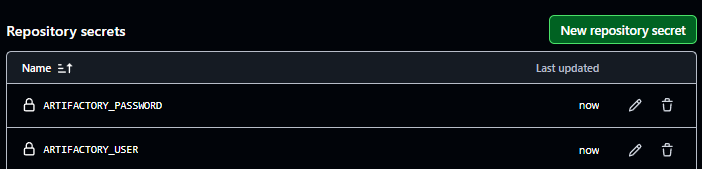
From actions workflow file, add ARTIFACTORY_USER, ARTIFACTORY_PASSWORD, and GRADLE_OPTS secret as environment variables.
jobs:
  build:
    env:
      ARTIFACTORY_USER: ${{ secrets.ARTIFACTORY_USER }}
      ARTIFACTORY_PASSWORD: ${{ secrets.ARTIFACTORY_USER }}
      GRADLE_OPTS: "-Dgradle.wrapperUser=${{ secrets.ARTIFACTORY_USER }} -Dgradle.wrapperPassword=${{ secrets.ARTIFACTORY_USER }}"
From actions workflow file, under "steps", add a gradle build task. Please note your gradle build command may be different.
- name: Run ./gradle build
  run: ./gradlew clean build
  working-directory: ./gradle-project/
JFrog Authentication with Ubuild
- Please follow the ubuild-integration-with-jfrog-artifactory